

How to Spot a Phishing Email
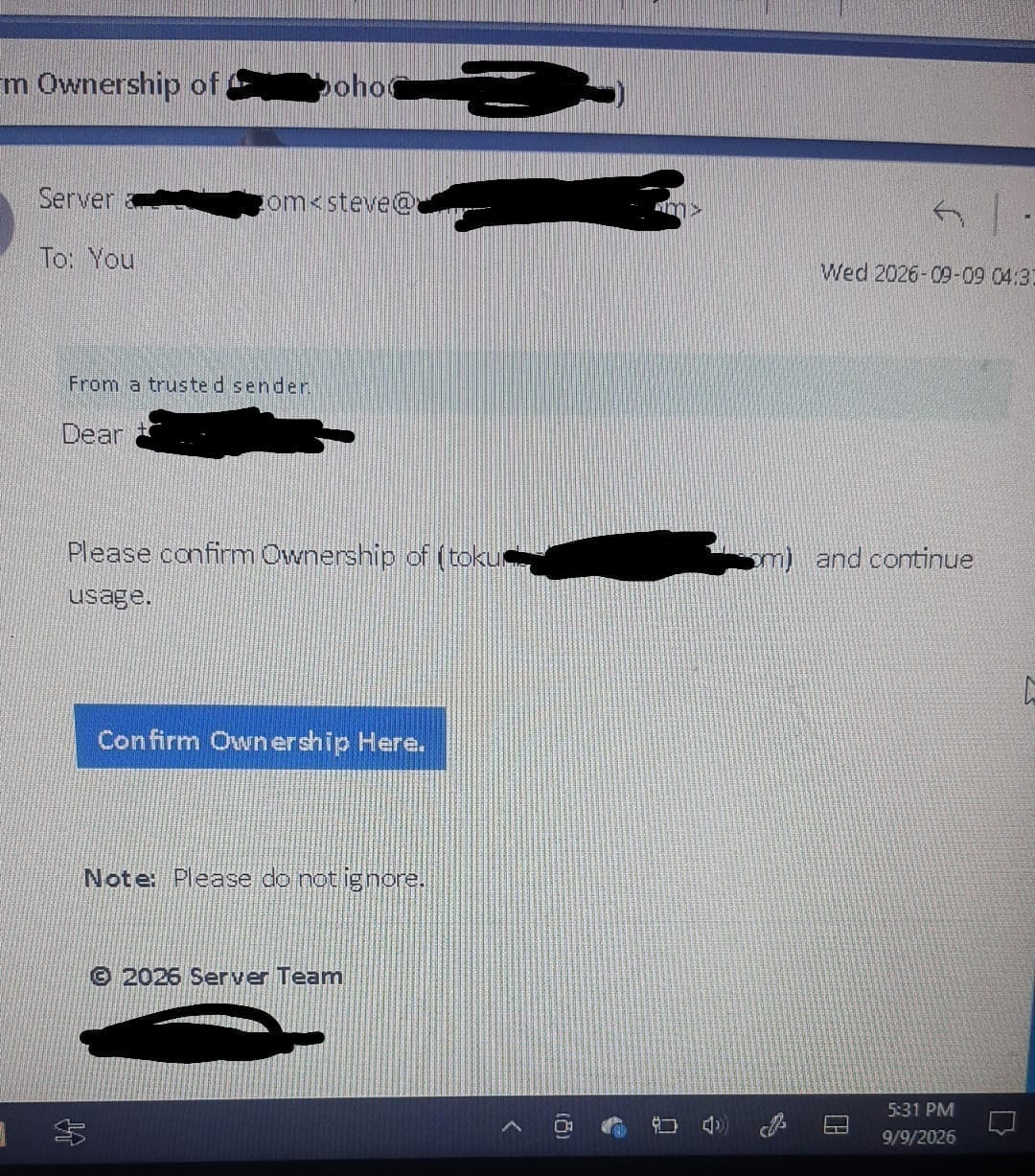
How to Spot a Phishing Email A client we previously worked with on his website at Fantop recently sent us a screenshot of an email he received.
He had a simple question: “Should I confirm the ownership?”
The email appeared to be asking him to confirm ownership of a domain or website. cIt looked official enough to make someone pause.
So he did the right thing. Instead of clicking the link, he contacted us.
Our response was straightforward:
No. Do not click it.
The email showed several signs of a potential phishing attempt.
This situation is worth sharing because phishing emails are becoming increasingly convincing. They are no longer limited to poorly written messages with obvious mistakes. Some are designed to look like legitimate notifications from companies, website providers, banks, hosting companies and other online services.
What Is a Phishing Email?
A phishing email is a fraudulent message designed to trick you into taking an action that benefits the attacker.
That action might involve clicking a malicious link, entering your password, submitting personal information, downloading a harmful file or giving someone access to your account.
The message often creates a sense of urgency.
You may be told to:
- Confirm your account
- Verify ownership
- Reset your password
- Make an urgent payment
- Update your information
- Prevent your account from being suspended
- Click a link before a deadline
The goal is to make you act before you have time to properly verify the message.
Why This Email Caught Our Attention
The email our former client received was presented as an ownership confirmation request.
It included wording similar to:
“Please confirm Ownership … and continue.”
It also provided a link labelled “Confirm Ownership Here.”
There was another instruction:
“Please do not ignore.”
How to Spot a Phishing Email
These are the kinds of messages that deserve extra attention.
An unexpected request to confirm ownership of a website or domain should not automatically be trusted simply because the email looks professional.
A Professional-Looking Email Can Still Be Fake
One important lesson from this incident is that a professional-looking sender address does not guarantee that an email is legitimate.
Scammers can make phishing messages look remarkably convincing. They can copy branding, use familiar terminology and create messages that appear to come from services you already use.
That is why you should look beyond the appearance of the email.
How to Spot a Phishing Email
Check the sender address carefully. Look at the actual link destination. Think about whether you were expecting the message in the first place.
Most importantly, don’t let urgency make the decision for you.
5 Things to Check Before Clicking an Email Link
- Check the Sender Address
Don’t only look at the name displayed as the sender.
Open the sender details and examine the actual email address.
A name that looks familiar can be used to disguise a completely different address.
- Check the Link
Before clicking a link, carefully inspect where it leads.
If the email claims to be from a company you use, the link should lead to a legitimate domain associated with that company.
If the destination looks strange, contains an unfamiliar domain or doesn’t match what you expected, don’t click it.
- Ask Yourself: Was I Expecting This?
This is one of the simplest security checks.
If you never requested an ownership confirmation, password reset or account verification, ask yourself why you’re receiving one.
An unexpected email deserves verification before action.
- Don’t Be Pressured by Urgency
Messages such as:
“Act now.”
“Your account will be suspended.”
“Do not ignore.”
are designed to encourage quick action.
Stop.
Take your time and verify the request through an independent channel.
- Go Directly to the Official Website
If you believe the email might be genuine, don’t use the link inside the email.
Instead, type the official website address into your browser yourself or use a trusted bookmark.
Log into your account and check if the same notification appears there.
This simple habit can prevent many phishing attacks.
What Should You Do If You Receive a Suspicious Email?
Don’t click the links.
Don’t download attachments.
Don’t enter your password or personal information.
Don’t reply with sensitive information.
Instead, verify the message through the company’s official website or another trusted communication channel.
If you’re responsible for a business website, domain or company email account, be particularly careful. Compromising one account can potentially affect your website, business communication and customer information.
One Simple Rule to Remember
If you are unsure, don’t click. Verify first.
That was exactly what our former client did.
He wasn’t sure whether the email was legitimate, so he asked before taking action. That small decision may have prevented a much bigger problem.
At Fantop, we believe that helping businesses go digital should also mean helping them understand the risks that come with being online.
A website can help your business build credibility and reach more customers, but your digital presence also needs basic security awareness.
The next suspicious email you receive may look convincing.
Take a second look.
Think twice. Verify first. Stay safe online.
Leave a Reply